


Overview
Recently, I have been considering moving the blog portion of my website (written in Wordpress) to a simpler, easier-to-maintain static site. After reviewing many options, including Hugo, Jekyll, and Zola, I settled on Astro - a nicely designed extensible static site generator that lets you work with standard markdown but gives you the ability to bring in extensible HTML-like code with MDX support.
Part of what pushed me to Astro is that its in a language (Typescript) that I’m relatively comfortable with so I can modify it if necessary. For reference, Hugo is in Go, Jekyll is in Ruby and Zola is in Rust.
Logic
- Click Push
- Reads MD in memory
- For any statically linked media replaces
![[amiga computer.png|500]]with the Astro static media folder and compresses images (and animated GIF) into webp files - - Copy into the project path/media folder
- For any statically linked media replaces
- Builds Astro content
- Pushes to Github
- Github runner kicks off and pushes site to remote VPS
Usage
Create a markdown note in obsidian and add the minimum frontmatter:
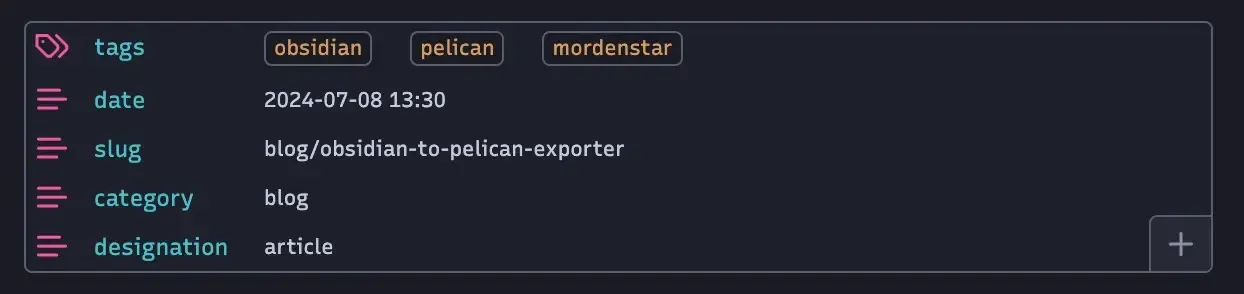
Slug determines the URL whereas category creates a “directory” that visitors can use for those posts. The title of post is determined by the file name or can be overridden by using title in the frontmatter.
Designation defaults to article but can be changed to a more static type of non-chronological using page.
Use the command palette to Push to Markdown which copies over the files to the Astro site. From there run Astro builds the production output, and it is committed to the github repo where a Github action automatically handles uploading the new article to the connected VPS.
Setup “ignore tags” in the options such as the site name so you can tag site content appropriately without it cluttering the site itself.
If you have a bottom section of “errata” or unused content that you don’t want to include as part of the Astro site, use a 16 length dashed line, e.g.:
INCLUDED CONTENT
--------------- (Add one dash here)
IGNORED CONTENT
Image Compression
To handle image compression, we use the Squoosh tool provided by Google Labs. More information about Squoosh can be found at the following link: Squoosh on GitHub.
Unfortunately, due to a lack of updates and full-time maintenance, the CLI version of the Squoosh tool was discontinued some time ago. To address this, we have forked the last updated CLI branch of the tool and configured it in our Obsidian-to-Astro settings, allowing us to compress static images effectively.
Let’s give it a whirl with something relatively high entropy—a painting by Jackson Pollock.

Oh wait, hang on that’s just a white noise pattern. Here we go.
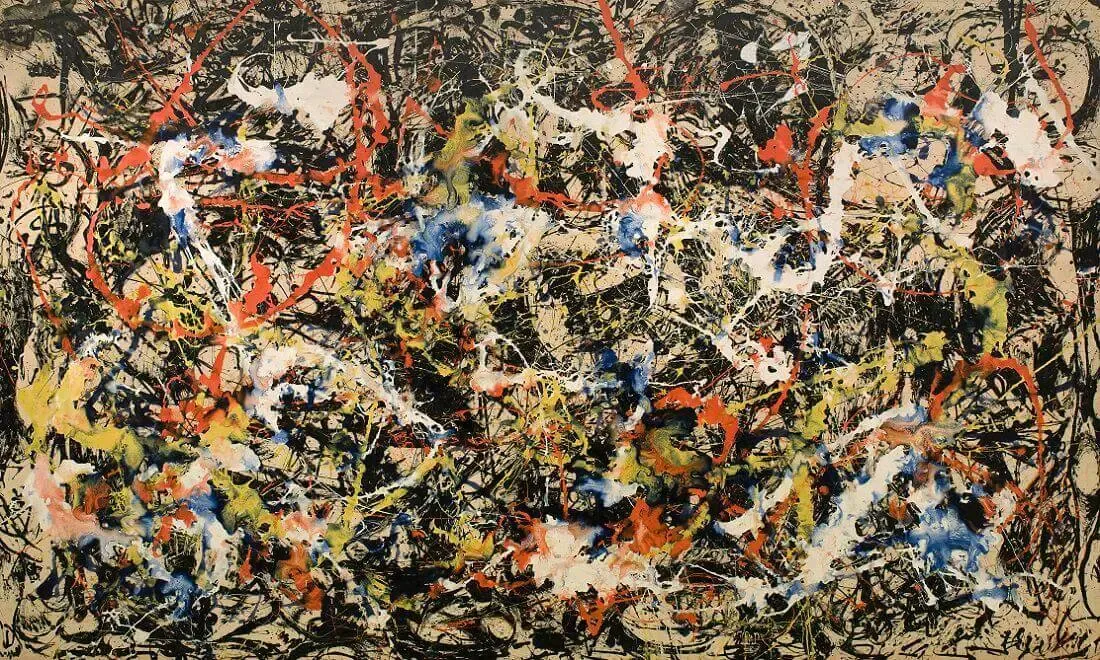
This is a PNG of Pollock’s painting “Convergence,” which originally weighs in at a whopping 2 MB. After running it through our tool, the file size is reduced to around 300 KB, representing an 85% reduction in size.
Also don’t try to convince me that Pollack’s entire artistic methodology didn’t originate from him spending hours toiling over the perfect illustration only to accidentally knock over his ink Dick Van Dyke style ruining the painting.
Animation Compression
Unfortunately squoosh doesn’t support exporting animated WebP - so we’ll have to use ffmpeg to convert animated GIF files using the following command:
ffmpeg -f gif -i input.gif -c:v libwebp -loop 0 output.webp
This particular GIF went from about 600kb to half that size at 300kb.
Animation Compression Update
Unfortunately, WebP seems to have serious decoding issues on iOS devices - to the point where the animations stutter and drop frames until their first playthrough. Since this is unacceptable, we’re going to add in a new compression system that follows these steps:
graph TD
    A[Incoming media] --> B[Detect media type]
    B --> C[GIF]
    B --> D[PNG]
    B --> E[JPG]

    C --> F[Is it over some size threshold?]
    F --> G[Compress as a smaller GIF using gifski]
    G --> H[Is it still over some size threshold?]
    H --> I[Compress as MP4 using FFmpeg]

    D --> J[Does it contain transparency?]
    J --> K[Use pngquant]
    J --> L[Use MozJPEG]

    E --> M[Use MozJPEG]
It’s kind of annoying since we effectively have to use a minimum of four tools:
- ffmpeg - Animated GIF -> Animated WebP / MP4
- pngquant - Alpha PNG -> Compressed Alpha PNG
- gifski - Animated GIF -> Compressed Animated GIF
- squoosh - PNG / JPG -> WebP
Choosing a Theme
Deliberating between hundreds of themes eventually becomes a weird corollary to semantic satiation but we eventually settled on a slightly modified variant of octopress.

Serving the Site via Caddy
We actually use this one for our astro site mordenstar.com
www.mordenstar.com, mordenstar.com {

	handle {
		root * /home/webuser/www/mordenstar/output

        # Clean URLs for .html files
        try_files {path} {path}.html

		file_server
		encode gzip
	}
}
The try_files section allows users to specify URLs without having to append html keeping our URLs significantly cleaner.
Admonition
We want to replicate this:

Successful test:
ADMINITION CALLOUT
This admonition was successfully converted into a custom html template.
Title Font
Arial sans-serif

Helvetica Neue
Weight: 800
Main font
Merriweather
Weight 100
Italic

Helvetica Neueu
Weight 300
Non-italic
What I’m going to miss from Wordpress
While I am aware of purely front-end solutions for adding a comment section, many of these rely on third-party vendors meaning I’m not entirely in control over my website. This is one advantage WordPress offers, despite it being somewhat bloated. All content related data in WordPress is stored in a mySQL database.
Cusdis (GPL equivalent of Disqus) is certainly an option though I would have to self-host it.
I’m open to any alternative ideas so be sure to leave a comment below! /s
To Do
- Ensure included width size is used as a pecentage against max size of image and set up as a percentile against max-width in an embedded img style.
- Ensure that the slug section creates the corresponding directories in the
contentfolder even though theslugalready determines output path - it still makes it more human readable. - Designate a classification frontmatter
designationwhich defaults toarticlebut can be overridden to bepageso that its placed in thepagesubfolder - Animated gifs are aggressively compressed into animated WebP
- Images can now be centered by adding
.center.to the file name - Automatically derive summary/description for use with opengraph
- Add social images onto article / blog index pages
- Option to compress JPG/PNG without converting
- Option to convert animated gifs to autoplaying muted MP4s
- Support for SVG
- Where a max width is specified (e.g.
|500px) - let’s use this to actually downscale the image using a high quality downscaler before copying them image. This way we don’t have to build in CSS styling, it will already be the correct size, and the scaling will look nicer across cross platform browsers. - Build in proper support for
Pictureelements to support responsive resolutions.